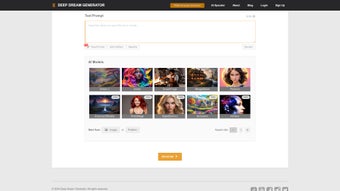

Download DeepDreamGenerator – AI Image Generation, Free Trial, Secure Cloud Tool
Overview
DeepDreamGenerator is a cloud‑based AI image creation platform that brings the power of Stable Diffusion to anyone with an internet connection. Whether you are a seasoned graphic designer, a hobbyist photographer, a marketer looking for eye‑catching visuals, or a complete beginner, the service lets you transform simple text prompts or existing photos into stunning visual artworks. The tool is organized around three core modules: Text 2 Dream, which turns written descriptions into photorealistic or stylized images; Deep Style, which applies learned painting techniques to your uploads; and the classic Deep Dream engine, which generates psychedelic, abstract compositions that reveal the inner workings of deep neural networks.
Because it runs entirely in the browser, there is no need to install heavyweight software on your PC or Mac, and the platform is continuously updated with new models, style libraries, and performance improvements. Users can start with a free tier that provides limited daily renders, then upgrade to a subscription for higher resolution, faster queues, and priority access to the latest AI releases. The result is a versatile, secure, and user‑friendly design tool that makes AI‑driven creativity accessible to everyone.
In addition to the core features, DeepDreamGenerator offers collaborative galleries, API access for developers, and a robust moderation system that ensures community content remains appropriate. Security is a top priority: all uploads and generated images are encrypted at rest and transmitted over HTTPS, complying with GDPR and other privacy standards. Whether you need quick social‑media graphics, concept art for a game, or experimental pieces for an art exhibition, DeepDreamGenerator provides a reliable, on‑demand creative engine that scales with your imagination.
Key Features and Functionalities
The strength of DeepDreamGenerator lies in its breadth of capabilities combined with a clean, intuitive interface. Below is a detailed look at the most important functionalities that set this service apart from competing AI art platforms.
- Text 2 Dream: Generate images from plain language prompts, with optional seed images for guided composition.
- Deep Style Transfer: Apply famous artistic styles (Impressionism, Cubism, Anime, etc.) to any uploaded picture.
- Classic Deep Dream: Produce surreal, fractal‑like visuals that highlight neural network patterns.
- Stable Diffusion Backbone: Leverages the latest open‑source diffusion model for high‑quality, realistic outputs.
- Customizable Parameters: Adjust steps, guidance scale, aspect ratio, and seed values for precise control.
- Batch Rendering: Queue multiple prompts or images and let the cloud handle processing.
- Community Gallery: Browse, like, and remix creations shared by other users for inspiration.
- Secure Cloud Storage: All uploads and generated images are encrypted at rest and transmitted over HTTPS.
- Regular Updates: New model versions, style packs, and UI enhancements are rolled out monthly.
- Cross‑Platform Access: Works on Windows, macOS, Linux, Android, and iOS browsers without additional downloads.
Each feature is designed to be accessible without a steep learning curve. For example, the Text 2 Dream module offers preset “creative styles” that automatically adjust guidance scale and sampling steps, delivering high‑quality results with a single click. Meanwhile, power users can dive deeper into the advanced settings to fine‑tune the diffusion process, control color palettes, or even upload custom model checkpoints via the API. The community gallery not only showcases user‑generated art but also provides a “remix” button, allowing you to inherit a base image and apply your own prompts, fostering a collaborative creative ecosystem. Security measures such as two‑factor authentication and automatic data expiration for free‑tier accounts further reassure users that their intellectual property remains protected while they experiment with cutting‑edge AI techniques.
Getting Started: Installation, Usage, Compatibility, and Pros & Cons
Installation & First‑Run Instructions
Because DeepDreamGenerator is a web application, the “installation” process is limited to creating an account and granting browser permissions. Follow these steps for a smooth start:
- Visit deepdreamgenerator.com and click the Sign Up button.
- Enter a valid email address, create a strong password, and confirm your account via the verification email.
- Log in and navigate to the Dashboard. Here you’ll see three tabs: Text 2 Dream, Deep Style, and Deep Dream.
- For Text 2 Dream, type a descriptive sentence (e.g., “A tranquil sunrise over misty mountains”) and optionally upload a reference image to guide composition.
- Select your desired resolution (up to 1024 × 1024 px on the free tier) and click Generate. The cloud will queue your request, and the result appears within seconds to minutes, depending on server load.
- To use Deep Style, upload a photo, choose a style from the dropdown (or upload a custom style reference), and adjust intensity sliders.
- For the classic Deep Dream, simply upload an image and select a “dream level” – the higher the level, the more intricate the patterns.
- All generated outputs can be downloaded directly or saved to your personal gallery for later editing.
- Advanced users can access the API Console from the dashboard to integrate the service into custom workflows, automating batch renders or linking with third‑party design tools.
Compatibility (itemprop="operatingSystem")
Since the service runs in a browser, it is compatible with any modern operating system that supports HTML5 and WebGL:
- Windows 10/11 – Edge, Chrome, Firefox, or Opera.
- macOS Catalina or later – Safari, Chrome, or Firefox.
- Linux distributions – Chrome, Firefox, or any Chromium‑based browser.
- Android 8.0+ – Chrome or native WebView‑enabled browsers.
- iOS 13+ – Safari or Chrome.
No additional plugins or GPU drivers are required, although a stable internet connection (minimum 5 Mbps) ensures timely rendering. For power users, enabling hardware acceleration in the browser settings can slightly reduce latency during image preview generation.
Pros and Cons
Pros
- Highly intuitive UI—perfect for beginners.
- Leverages the powerful Stable Diffusion model for realistic outputs.
- No local installation; works on any device with a browser.
- Secure, encrypted cloud storage protects user data.
- Frequent feature updates keep the tool on the cutting edge.
- Community gallery fosters inspiration and collaboration.
- Flexible pricing: free tier plus affordable subscription plans.
- API access enables integration with design pipelines.
- Batch processing saves time for large projects.
- Responsive design works equally well on tablets and smartphones.
Cons
- Render times can be longer during peak usage on the free tier.
- Higher‑resolution images require a paid subscription.
- Limited offline capability—cannot generate images without internet.
- Some advanced Stable Diffusion parameters are hidden from casual users.
- Occasional style‑library lag when new models are being integrated.
- Free tier imposes daily render caps that may hinder heavy hobbyists.
- API usage beyond the free quota incurs additional costs.
Review (itemprop="review")
Overall Rating: 4.5/5
Reviewed by Alex Rivera
DeepDreamGenerator delivers an impressive blend of creativity and technology. The Text 2 Dream module is remarkably accurate for a web‑based service, while Deep Style offers a delightful way to experiment with classic art movements. Although the free tier imposes modest limits, the subscription cost is reasonable for professionals who need higher resolution and faster queues. The only drawback is the occasional wait time during high traffic, but overall the platform is reliable, secure, and continuously improving.
- Pros: intuitive UI, powerful AI, cross‑platform access.
- Cons: limited offline use, premium pricing for high‑res.
Frequently Asked Questions
Below you will find answers to the most common questions about DeepDreamGenerator. If you have additional queries, the support center and community forums are excellent resources for detailed guidance.
Can I use DeepDreamGenerator on a mobile device?
Yes. The web app is fully responsive and works on Android and iOS browsers. All features—including Text 2 Dream, Deep Style, and Deep Dream—are accessible from smartphones and tablets.
Is there a completely free version?
DeepDreamGenerator offers a free tier that allows a limited number of daily renders at lower resolutions (up to 512 × 512 px). It’s ideal for casual users who want to experiment before committing to a subscription.
What file formats can I upload and download?
Supported upload formats include JPEG, PNG, and WebP. Generated images can be downloaded as PNG or JPEG, with the option to retain transparency when applicable.
How does the subscription pricing work?
There are three plans: Basic ($9.99 / month) for 1024 × 1024 px renders, Pro ($19.99 / month) for up to 2048 × 2048 px and priority queuing, and Enterprise (custom pricing) for bulk API access and on‑premise options.
Is my data safe on the platform?
All uploads and generated images are encrypted both in transit (HTTPS) and at rest. The service complies with GDPR and does not share user content without explicit permission.
Can I integrate DeepDreamGenerator into my own applications?
Yes. DeepDreamGenerator provides a RESTful API with authentication tokens, allowing developers to submit prompts, retrieve results, and manage assets programmatically. Documentation and SDKs for Python, Node.js, and Java are available on the developer portal.
What happens to my images if I cancel my subscription?
When a subscription ends, all premium‑resolution images remain in your personal gallery for 30 days, after which they are automatically deleted to free storage space. Free‑tier users retain access to lower‑resolution versions of their creations.
Conclusion & Call to Action
DeepDreamGenerator stands out as a versatile, cloud‑native AI art engine that balances ease of use with professional‑grade output. Its three‑module approach covers everything from quick text‑based concepts to deep‑style transformations and mind‑bending dreamscapes. While the free tier has modest limits, the subscription plans are competitively priced for creators who need higher resolution and faster processing.
Security, regular updates, and cross‑platform compatibility make it a reliable addition to any digital artist’s toolkit. If you’re looking to explore AI‑driven creativity without the hassle of installing heavy software, give DeepDreamGenerator a try today—start with the free account, test the Text 2 Dream feature, and upgrade when you’re ready to unleash full‑resolution, custom‑style masterpieces. Download now, create instantly, and join a thriving community of innovators who are redefining visual storytelling with AI.
Download DeepDreamGenerator now and turn your imagination into visual reality.



.png)



